

Quick answer: AI tools like Microsoft Copilot are used in finance to automate financial reports, analyse data and spot trends, build forecasts and budgets, speed up month-end close with reconciliations and draft journal entries, and prepare first drafts of BAS summaries and management commentary. For Australian firms, Copilot works alongside Xero, MYOB or QuickBooks rather than replacing them, and its output still needs review by a qualified professional before anything is lodged or reported.
For practical use cases, how Copilot connects to your accounting software and what it can’t do, dive into the full article below.
AI tools like Microsoft Copilot are revolutionising financial processes, offering new ways for finance teams to boost productivity and make strategic decisions. But how can AI be used in finance?
Microsoft Copilot answers this by streamlining tasks such as financial planning, analysing large datasets, and managing regulatory compliance. This AI-driven solution empowers professionals to work smarter, not harder, freeing up time for value-added activities like risk assessment and strategic planning.
Read on and find out how AI will affect the finance industry, the many use cases of Copilot in accounting, and the collaborative potential of combining AI with a human touch.
What is Microsoft Copilot?
Microsoft Copilot is an artificial intelligence (AI) tool that integrates seamlessly with popular Microsoft 365 applications like Excel, Word, and Teams. Built on generative AI technology, it assists finance teams by automating routine tasks, enhancing data analysis, and providing actionable insights for informed decisions.
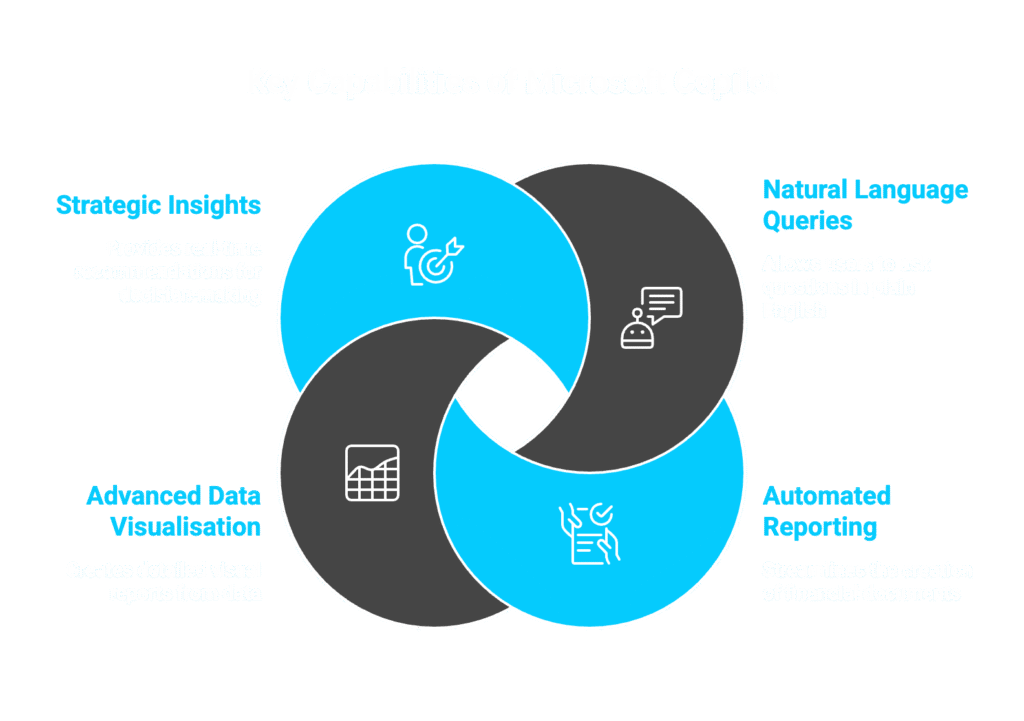
Key capabilities of Microsoft Copilot include:
- Natural Language Queries: Users can input queries like “Show the company’s financial trends for the past quarter” to instantly generate graphs and reports.
- Automated Reporting: From creating tax summaries to compiling monthly financial statements, Copilot streamlines documentation, saving time and reducing human error.
- Advanced Data Visualisation: By analysing large datasets, Copilot produces detailed visual reports, aiding in financial planning and risk assessment.
- Strategic Insights: The tool provides real-time recommendations, helping businesses identify potential risks and opportunities.
With its user-friendly interface, Microsoft Copilot is designed to help finance professionals embrace AI and make informed decisions quickly.
Learn more: Microsoft Copilot Free VS Pro: Which Do You Need?
Copilot and Your Accounting Software: Xero, MYOB and QuickBooks
Most Australian firms run Xero, MYOB or QuickBooks as their core ledger, and Copilot works alongside these platforms rather than replacing them.
On 1 July 2026, Xero announced a direct integration with Microsoft 365, powered by its AI financial superagent JAX. The integration brings live Xero data into Copilot Chat, with Excel, Word and PowerPoint integration planned as the rollout expands. Finance teams can ask plain-English questions about profit and loss, cash position or overdue invoices and get answers grounded in real-time Xero data. Copilot Chat provides clickable links back into Xero to complete tasks like sending payment reminders, so Xero remains the source of truth and the destination for deeper work. Xero plans to expand the integration to include Outlook and Teams.
MYOB and QuickBooks users can achieve a similar outcome through Microsoft Copilot Studio connectors or by exporting data into Excel for Copilot to analyse. MYOB’s existing integration with Australian Taxation Office systems for Single Touch Payroll and BAS lodgement complements Copilot’s reporting capabilities, though there is no direct MYOB-to-Copilot connector at the time of writing.
Can AI Replace Finance Jobs?
One of the most pressing concerns in regards to AI is, will finance be replaced by AI? While advancements in AI have automated many tasks, it’s important to understand that AI is more of an enabler than a replacement.
AI-driven tools like Microsoft Copilot are designed to enhance the capabilities of finance teams by handling repetitive and time-consuming tasks such as data entry, financial report generation, and regulatory compliance.
By taking over these routine activities, AI allows finance professionals to focus on more complex responsibilities like risk assessment, financial planning, and strategic decision-making. Far from eliminating roles, AI creates opportunities for finance teams to contribute greater value to their organisations by analysing large datasets, improving efficiency, and making informed decisions.
Moreover, while AI tools excel at processing data and identifying patterns, they lack the human touch needed for nuanced decision-making, ethical judgement, and personalised customer service. These elements remain essential in the finance industry, showcasing that AI complements human roles rather than replacing them.
Collaborative Potential: Humans and AI
The collaborative potential of humans and AI is transforming the way finance teams operate. AI tools like Microsoft Copilot enhance human expertise by providing actionable insights and automating mundane tasks. For instance:
- Financial Analysis: Copilot analyses large volumes of data, quickly identifying trends and anomalies that might take a human much longer to detect. However, human expertise is essential to interpret these findings and determine their implications.
- Strategic Decision-Making: AI provides accurate forecasts and risk assessments, but it’s up to finance professionals to align these insights with the company’s goals and make strategic decisions.
- Regulatory Compliance: While Copilot ensures compliance by automatically checking regulations, human oversight is crucial for handling complex cases and understanding regulatory nuances.
This collaboration not only boosts productivity but also creates opportunities for upskilling. As finance professionals work alongside AI-driven tools, they can learn new skills such as data science, AI literacy, and advanced financial modelling.
Copilot Key Features for Accounting Professionals
Microsoft Copilot offers a range of features tailored to meet the needs of finance teams, making it an essential tool for accounting professionals. Here’s how it addresses common financial tasks while answering the question of how to use AI in accounting and finance:
1. Automated Financial Reports
Copilot automates the creation of detailed financial reports, such as profit-and-loss statements, balance sheets, and cash flow reports. This feature reduces manual effort and ensures accuracy, a critical factor in financial regulatory compliance and risk management.
2. Data Analysis and Visualisation
By analysing large datasets, Copilot provides real-time insights into financial trends. It generates easy-to-understand graphs and charts, helping finance teams spot patterns and make strategic decisions.
3. Budgeting and Financial Forecasting
Copilot predicts future financial outcomes based on historical data. This supports better financial planning and helps companies anticipate market changes.
4. Tax and Compliance Management
With its ability to manage complex tax calculations and compliance requirements, Copilot simplifies these time-consuming processes. Finance professionals can ensure regulatory compliance while focusing on other tasks.
5. Risk Assessment Tools
Copilot assists in identifying potential risks by providing detailed risk assessments. This feature empowers financial institutions to strengthen their risk management strategies and safeguard their assets.
6. Streamlining Month-End Closings
Copilot simplifies the month-end process by automating reconciliations, consolidating financial data, and generating required reports. This reduces the time typically spent on manual tasks and allows for faster closings.
7. Payroll Management
Managing payroll becomes effortless with Copilot, as it calculates wages, deductions, and taxes while ensuring compliance with current regulations. This eliminates the potential risks of manual payroll errors.
Learn more: Top Trends Shaping Accounting Technology in 2025
Month-End Close with Copilot: Before vs After
| Before Copilot | After Copilot |
|---|---|
| Manual export of transactions into Excel | Live ledger data pulled directly into Excel (via Xero integration or Dynamics 365 connector) |
| Hours matching bank lines by hand | Matches and mismatches flagged automatically |
| Accrual journals prepared manually | Draft journal entries prepared for review |
| Commentary written from scratch after close | Draft narrative summary generated in Word for review |
| A two-day close stretches to a week | Manual wrangling compressed, freeing time to review and analyse |
Copilot for Finance in Dynamics 365
It’s worth distinguishing Microsoft 365 Copilot, the assistant in Excel, Word and Teams, from Copilot for Finance in Dynamics 365, a separate product built directly into Microsoft’s ERP platform for organisations running Dynamics 365 Finance rather than a small-business platform like Xero or MYOB.
Copilot for Finance in Dynamics 365 assists with account reconciliation, answers natural-language queries such as “show me accounts payable aging over 90 days”, drafts collection reminder emails, and generates cash flow narratives. Microsoft’s Wave 1 2026 release (April 2026) added a Payflow Agent that autonomously processes routine vendor payments within configured parameters — monitoring payment queues, verifying vendor banking details against master data, executing payment runs, and posting journal entries without human intervention for in-policy transactions. Exceptions such as new vendors, amount threshold breaches, or data mismatches are escalated for human review.
Most Australian firms get the most value from M365 Copilot alongside Xero, MYOB or QuickBooks, while larger enterprises on Dynamics 365 gain this deeper, more autonomous layer.
2026 Copilot Capabilities: Copilot Pages and Python in Excel
Two 2026 updates matter most for finance teams evaluating Copilot today.
Copilot Pages: Turns a Copilot conversation or set of figures into a persistent, shareable document, letting a team build a variance analysis together and generate dashboards inside the page.
Python in Excel: Lets Copilot write and run Python code from a plain-English prompt, no coding required. Ask Copilot to forecast next quarter’s revenue, and it generates the code, runs it in a secure cloud sandbox, and returns charts and results using libraries such as pandas directly into your spreadsheet.
Together, these bring genuine forecasting and anomaly detection into the same spreadsheet finance teams already use every day.
Australian Compliance Context: ATO Reporting and BAS Preparation
For Australian firms, compliance isn’t optional, and Copilot needs to be used carefully alongside qualified professional judgement. It can support BAS preparation by pulling GST collected and GST paid figures from connected accounting data and drafting a summary for review, and answer questions such as “what is our quarterly GST liability” using figures grounded in the ledger. For broader ATO reporting, it can draft correspondence, summarise changes to tax rulings, and flag anomalies against prior periods before lodgement.
What Copilot cannot do is replace a registered BAS agent or tax agent’s sign-off. Like any AI tool, it can produce plausible but incorrect figures from messy source data, so its output should be treated as a first draft, not a lodgement-ready document, with a qualified practitioner reviewing every submission.
Embrace AI in Your Financial Processes
From financial planning and risk management to regulatory compliance, Copilot’s AI capabilities provide businesses with the tools needed to thrive. Instead of asking ‘Will finance be replaced by AI?’ businesses should focus on how AI can enhance their operations and deliver greater value.
As a specialised provider of IT solutions to accounting firms, Steadfast Solutions can help you integrate Microsoft Copilot into your existing IT environment, and guide your team through its features and capabilities. Let us show you how this AI-driven tool can improve efficiency, reduce costs, and empower your finance team to achieve more.
FAQs
Does using Copilot in Excel require my data to be in a specific format?
Yes, to get the most out of Copilot, your financial data must be formatted as an “Excel Table.” The AI cannot effectively analyse “flat” data or messy spreadsheets with merged cells and inconsistent headers. Before asking Copilot to identify trends or create visualisations, ensure your data range is highlighted and converted into a Table (Ctrl+T) so the AI can recognise the rows and columns correctly.
Is there a risk of "AI Hallucinations" in financial reporting?
Like all Large Language Models, Copilot can occasionally produce “hallucinations”—answers that sound confident but are mathematically incorrect. In an accounting context, this is a serious risk. To manage this:
- Verify Formulas: Never take an AI-suggested formula at face value without checking the logic.
- Cross-Reference: Always compare AI-generated summaries against your source ledger or trial balance.
- Human Oversight: Use Copilot to draft the report but rely on a human expert to finalise the numbers.
Can Copilot access my firm’s historical paper records?
Copilot can only “see” and interact with digital data that is stored within your Microsoft 365 environment (like OneDrive, SharePoint, or Teams). If your historical financial records are stored as physical paper files or local PDFs on a hard drive, the AI cannot access them. To leverage Copilot for historical trend analysis, you must first digitise those records and upload them to a secure Microsoft cloud location.
How does Copilot ensure client confidentiality in a shared environment?
Microsoft 365 Copilot respects the “Permissioning Model” already set up in your organisation. This means:
- No Data Leakage: If a junior accountant doesn’t have permission to see the “Payroll” folder in SharePoint, Copilot will not show them any payroll data, even if they ask for it.
- Isolated Sessions: Your prompts and the resulting financial data are not shared with other Microsoft customers or used to train the global AI.
- Data Residency: For Australia firms, your data remains within the Australia data centres, helping you meet GDPR requirements.
Can Copilot integrate with third-party accounting software like Xero or Sage?
By itself, Copilot for Microsoft 365 focuses on the Office suite. However, you can extend its capabilities using “Plugins.” Many major accounting software providers are developing connectors that allow Copilot to pull data directly from your accounting software into Word or Excel. Without these plugins, you would need to export your data to an Excel file first before Copilot can help you analyse it.